
Scenario MCP guide
The plugin runs a local Scenario MCP server inside the Unreal Editor. An agent connected to it (Claude Code, Codex, Cursor, Claude Desktop or any MCP client) can read your level, price and run Scenario models and workflows, then import and place the results, in the editor that is open on your machine.
1. Connect an agent
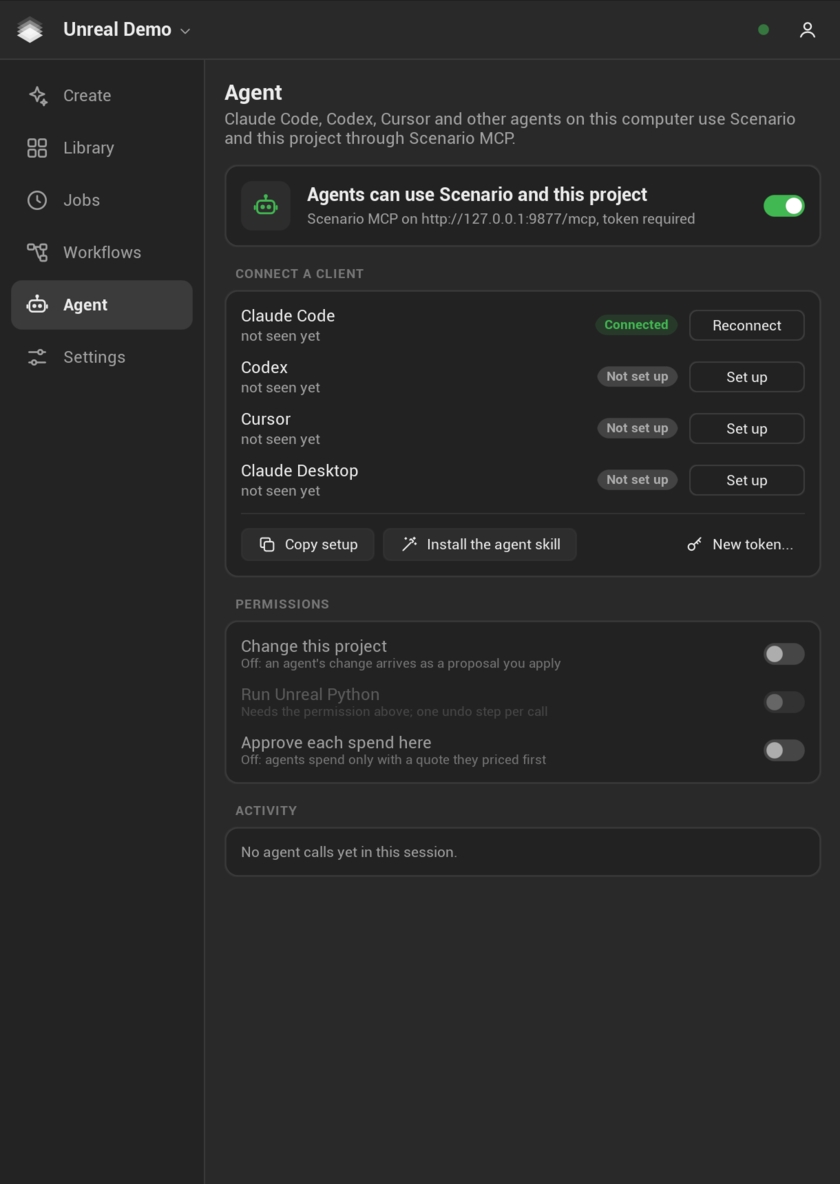
- Open the Agent page in the Scenario Studio (toolbar menu: More > Agent, or the agent dot in the Studio header).
- Check that the page says Scenario MCP on with its address (
http://127.0.0.1:9877/mcpunless that port was taken). If the server is off, turn on its switch. - Under Connect a client, click Set up next to your agent (Reconnect once it is set up). The plugin writes the server and its token into the agent's configuration, after saving a timestamped backup of the file (
<file>.scenario-backup-YYYYMMDD-HHMMSS). A file it cannot read is left untouched. - Restart the agent, or reload its MCP servers.
- Optional: Install the agent skill copies the
scenario-unrealskill to~/.claude/skills/. It teaches Claude the tool order and the spending rules.
| Agent | What Set up writes |
|---|---|
| Claude Code | claude mcp add --transport http --scope user scenario-unreal <url> --header "Authorization: Bearer <token>", or the same entry in ~/.claude.json when the claude command is not found |
| Codex | [mcp_servers.scenario-unreal] with url and http_headers in ~/.codex/config.toml |
| Cursor | mcpServers.scenario-unreal with url and headers in ~/.cursor/mcp.json |
| Claude Desktop | A stdio bridge, npx -y mcp-remote <url> --allow-http, with the header passed through the SCENARIO_UNREAL_AUTH environment variable (needs Node.js) |
For any other client, Copy setup puts the URL, the header and ready-made snippets on the clipboard. A typical JSON entry:
{
  "mcpServers": {
    "scenario-unreal": {
      "type": "http",
      "url": "http://127.0.0.1:9877/mcp",
      "headers": { "Authorization": "Bearer <token>" }
    }
  }
}
Never paste the token into a chat. New token... replaces it; connected agents then need Reconnect.
The editor must be open, signed in to Scenario, with a team and project chosen. Epic's own Unreal MCP server (port 8000 when enabled) is a different server. In Unreal 5.8 it also reaches Scenario, as a toolset (section 8). Both servers can be connected at once.
2. Permissions
| Switch (Agent page, Permissions; Editor Preferences > Plugins > Scenario name in brackets) | Default | Off means | On means |
|---|---|---|---|
| Change this project (Allow agent changes) | Off | apply_result_application returns pending_approval and you see Approve and Decline in the editor; save_changes and remove_scenario_items are refused |
The agent imports, places and saves what the plugin created |
| Run Unreal Python (Allow agent Python) | Off | execute_python is refused |
Unreal Python runs inside one undo transaction (needs the switch above and the Python Editor Script Plugin) |
| Approve each spend here (Approve agent spend) | Off | An agent spends with a valid price quote; a notification shows each spend | Each paid call waits for Approve or Decline in the editor (100 seconds) |
Reading the level (summaries, object details, screenshots, assets, the output log) and checking prices are always allowed. Agents never see your Scenario credentials.
3. Spending
Every paid call follows the same contract as the Studio:
estimate_cost(orestimate_workflow,estimate_prompt) is free and returns aquote_idandcu_cost_exact.generate(orrun_workflow,approve_prompt) needs thatquote_idandapproved_costequal tocu_cost_exact, character for character.- A quote is single use, bound to the exact model, settings and project, and expires after 120 seconds. Any change needs a new estimate.
- A paid call is sent once. If the connection drops, the job becomes
unknownand an identical request is blocked: callrecover_local_jobwithaction: "check", nevergenerateagain. Only you can mark a request as not sent. - With
SCENARIO_NO_SPEND=1in the editor's environment, every paid call is refused before anything is sent.
The plugin sets no Creative Unit cap of its own. The Activity list on the Agent page shows this session's agent calls, the latest 20, with the time, tool, client, the CU spent and any error.
4. Tools
Tool descriptions that spend start with SPENDS. Tools are annotated as read-only, destructive or idempotent for clients that use MCP annotations.
Status and level
| Tool | Does |
|---|---|
scenario_status |
Signed in, team and project, permissions, spending rules, server address |
scene_summary |
Level, World Partition state, selection, camera, actor counts by class, a page of actors with ids and tags. In a World Partition level only loaded actors are listed; open_world gives loaded and on-disk counts, one file per actor and the data layers |
object_detail |
One actor: transform, bounds, components, materials per slot, Scenario provenance |
screenshot_viewport |
PNG of the active level viewport, returned as an image; with camera (location_m, then look_at_m or pitch and yaw, and fov) it renders that view and leaves your viewport where it is. frame_check flags a frame that is all black, all white, uniform, clipped or crushed; exposure_override says when your viewport has a fixed exposure that the capture does not use |
find_assets, asset_detail |
Search the Content Browser; details and mesh checks for one asset |
output_log |
Recent warnings and errors, or Scenario and Interchange messages |
select_objects |
Selects actors in the level |
unreal_api_help |
Reflection help for an Unreal class, for writing Python |
execute_python |
Runs Unreal Python (permission needed) |
Models and generation
| Tool | Does |
|---|---|
list_models |
Models for a lane (image, video, 3d, material, audio, environment, render); the lane's picks first |
model_schema |
Parameters, options, defaults, which change the price, and the Unreal-ready prompt for 3D |
recommend_models |
Asks Scenario for the best models for a request |
estimate_cost |
Free price check; returns the quote |
generate |
SPENDS: runs the quoted request; returns job_id |
job_status, wait_for_job |
State and files of a job; wait_for_job returns still_running after 45 seconds by default, call it again. Both also take an approval_id (a spend waiting for you, see section 8) |
list_local_jobs, list_generations |
This project's job list; recent jobs on Scenario from any tool |
cancel_job |
Asks Scenario to stop a job |
recover_local_job |
check an unknown request against Scenario, or dismiss a row |
recover_cloud_job |
Links a job from list_generations into this project and downloads it, free |
Workflows, prompts, library and references
| Tool | Does |
|---|---|
list_workflows, workflow_schema, estimate_workflow, run_workflow |
Same shape as models; run_workflow SPENDS |
estimate_prompt, approve_prompt, read_prompt_result |
Prompt Spark: price, run (SPENDS), read the proposals |
list_assets, search_assets, list_collections |
Your Scenario project's library |
capture_reference |
Renders the viewport or exports actors to GLB, locally |
upload_reference, reference_upload_status |
Uploads a capture or a project file to Scenario; wait for imported, then pass its asset_id in a file field |
Landing results
| Tool | Does |
|---|---|
prepare_result_application |
Plans an import: import, place (at_location, at_pivot, in front of the camera by default), material (on actor_ids or the selection), environment, media_plate, mesh_edit; returns a review text |
apply_result_application |
Applies the plan, or returns pending_approval when changes are off; returns what changed and the import checks |
save_changes |
Saves what the plugin created; include_levels: true also saves the open level (with its World Partition actors) and unsaved assets under the Scenario folder. An untitled level is not saved: the result says so |
remove_scenario_items |
Removes actors the plugin placed and assets it imported, after Unreal's reference check |
Tool search (Editor Preferences > Plugins > Scenario > Agent tool search, off by default). The full tool list is about 29 KB, roughly 7,300 tokens, sent once per connection. With tool search on, tools/list holds four tools (about 1.4 KB): scenario_status, find_tools (names, kinds and descriptions matching a query), describe_tools (input schemas) and call_tool (runs a tool by name with the same permissions and money rules). Every tool also stays callable by its own name. Turn it on for a client that loads every tool into the model's context; clients that already defer tool definitions (Claude Code, for one) do not need it. It takes effect when the server restarts (the switch on the Agent page).
Kit: worlds, games and films (need the Change this project permission; distances in meters)
| Tool | Does |
|---|---|
build_world |
New level with light for a time of day, mist, ground, invisible walls, player start and the template game mode |
dress_world |
Landmark, a paved path from the player start, props with spacing (path_sides along the path, on_path for gates the player walks through, light for lanterns), ground material and tint, sky, mist and ambient sound on a build_world level. With a sky, the sun comes from the sun in the panorama when it shows a clear one |
make_game |
Pickups, an optional goal, timer, music and HUD on the open level |
dress_template |
Copies an Epic template level (platforming, combat...) and dresses the copy with Scenario materials, meshes, sky and music |
make_film |
Level Sequence: camera moves (aerial, crane, orbit, walk, detail, rise), cuts, fades, music and sound effects |
render_film, film_status |
Movie Render Queue render, then MP4 with sound when ffmpeg is installed; poll the status |
kit_status |
What the kit made in the open level; during Play, the player character and where it stands |
play_level |
Starts or stops Play in the editor; call kit_status a few seconds later to confirm the character spawned |
5. A session, step by step
Ask: "Put a mossy stone well next to the selected house."
scenario_status, thenscene_summaryto find the selection and the camera.list_models{ "lane": "3d" }andmodel_schemaon the first pick.estimate_cost{ "model_id": "<pick>", "parameters": { "prompt": "mossy medieval stone well, <unreal_ready_prompt>" } }returns aquote_idandcu_cost_exact.- The agent tells you the price, then calls
generate{ "quote_id": "...", "approved_cost": "<cu_cost_exact>" }. wait_for_jobuntildeliveredis true.prepare_result_applicationwithpurpose: "place",placement: "at_location"and a point beside the house fromobject_detail.apply_result_application. With changes off, you click Approve in the editor.- The agent reports the asset and actor it created and asks before
save_changes.
6. Security
- The server listens on
127.0.0.1only. It refuses requests whoseHostis not a loopback name and any request from a web page (Originheader), so a website cannot drive it. - The bearer token is random, stored in the system credential store, and compared in constant time. Turn Agent token off only for a client that cannot send headers.
- Tool results never contain Scenario credentials. Error messages have signed URLs and authorization headers removed.
- What an agent reads through the server (level summaries, screenshots, results) goes to that agent's model provider, under your agreement with that provider.
7. Troubleshooting agents
| Symptom | Fix |
|---|---|
The agent does not list scenario-unreal tools |
Restart the agent after Set up. Check that the Agent page says Scenario MCP on. |
| HTTP 401 | The token changed: click Reconnect for that agent. |
| Connection refused | The editor is closed, or the server is off (the switch on the Agent page, or Agent server in Editor Preferences). |
| The port is not 9877 | Another program held 9877, so the server took the next free port; Set up writes the right one. |
| HTTP 401 or odd answers after the editor crashed, while the Agent page shows a port other than the one in the agent's config | A leftover program can still hold the old port: on macOS the crash reporter of a crashed editor keeps its sockets open. Quit CrashReportClient (Activity Monitor), or click Reconnect so the agent uses the editor's current port. |
Auth: Not signed in |
Sign in from the Scenario toolbar button. |
Declined |
You declined the spend or the change in the editor. The agent must not retry it. |
pending_approval |
Waiting for Approve in the editor. The agent should check job_status later (with the approval_id when there is one), not apply or spend again. |
| A spend through Epic's Unreal MCP answers pending_approval although Approve each spend here is off | Expected: Epic's server has no token, so every paid call from it waits for you (section 8). |
8. Using Scenario through Epic's Unreal MCP
Unreal 5.8 ships an Experimental Model Context Protocol plugin: an MCP server inside the editor that exposes Epic's Toolset Registry through three tools, list_toolsets, describe_toolset and call_tool. On 5.8 the Scenario plugin registers a toolset there, so an agent connected to Epic's server can price and run Scenario models and land the results, next to Epic's own toolsets for actors, materials, Blueprints and the rest of the editor.
Turn it on
- Unreal 5.8. The Scenario plugin enables Epic's Toolset Registry plugin (an optional dependency, with the plugins it needs: Python Editor Script Plugin, Editor Scripting Utilities and File Sandbox). On 5.6 and 5.7 there is no registry and nothing changes.
- Enable Model Context Protocol in Edit > Plugins and start its server: its Auto Start Server setting (search for Model Context Protocol in the settings), or
-ModelContextProtocolStartServeron the command line. It listens on port 8000 by default, path/mcp. - Connect your agent to that server with Epic's own setup. The Agent page shows, under Epic's Unreal MCP, whether that server is running and on which port.
What the agent sees
- Toolset
ScenarioToolsets.ScenarioToolset, 19 tools:GetStatus,ListModels,GetModelSchema,RecommendModels,EstimateCost,Generate,ListWorkflows,GetWorkflowSchema,EstimateWorkflow,RunWorkflow,GetJobStatus,WaitForJob,ListJobs,CancelJob,CheckUnknownJob,SearchAssets,PrepareResult,ApplyResult,SaveChanges. They run the same actions as the tools of the same purpose on the Scenario MCP server. - Agent skill
/Script/ScenarioToolsets.ScenarioAgentSkill, listed by Epic'sToolsetRegistry.AgentSkillToolset(ListSkills,GetSkills). It carries the live state (signed in, project, Change this project, spending switch, lanes) and the rules the tool descriptions cannot: price first, never repeat a paid call, apply then save, and which work belongs to Epic's toolsets. - Optional parameters have a word as default (
all,auto,default,*,selection,none) because Epic's registry fills a left-out parameter only from its default.ParametersandInputsare JSON object text, for example{"prompt": "a stone well"}. - Not in the toolset: Python, removals, kit tools, uploads, Prompt Spark, and level reads and screenshots (Epic's toolsets cover the level).
A call through Epic's server:
{ "name": "call_tool", "arguments": {
  "toolset_name": "ScenarioToolsets.ScenarioToolset",
  "tool_name": "EstimateCost",
  "arguments": { "modelId": "<model id>", "parameters": "{\"prompt\": \"mossy stone well\"}" } } }
Spending. Epic's server has no token: any program on this computer can call it. So through the registry:
- Reads, prices (
EstimateCost,EstimateWorkflow) and job status are free and need no approval. GenerateandRunWorkflowcheck the quote andapproved_costfirst, then answer at once withstate: "pending_approval"and anapproval_id, and ask you in the editor, whatever Approve each spend here says. Approve sends the request once; Decline, or no answer before the quote expires, sends nothing. The agent follows theapproval_idwithGetJobStatusorWaitForJob; it becomes the job once sent.- The quote rules are the same: single use, 120 seconds, bound to the exact request. Asking again with the same quote returns the same approval. A paid call is never retried.
SCENARIO_NO_SPEND=1refuses before you are asked. ApplyResultandSaveChangesfollow Change this project, as on the Scenario MCP server.
Sizes. Epic's tools/list is three tools, about 1.7 KB. describe_toolset for the Scenario toolset is about 11.6 KB (about 2,900 tokens), loaded only when the agent asks for it.
More: Troubleshooting.